Asus Padfone: Stroke of Genius?

It’s been a while since my last blog post, and there are two reasons for that. One: I’ve been busy working and two: I’ve been neglecting the blog in what spare time I have had. But enough excuses, on to content new!

While away in Asia on a business trip I discovered the Asus Padfone series. The basic idea of the Padfone is that it delivers both a smartphone and a tablet experience, but without two set of apps, data etc. In the traditional model you’d have a smartphone and a tablet: Apple fans with their iPhone and iPad, and Android people with their Nexus’s and Galaxy Tabs. Many people have both devices because there are times when only a smartphone will do — out and about, on the town, parties.. when you need your device to fit in a trouser pocket — and there are times when only the larger display a tablet provides will do too. I’m thinking reading the news, playing games, watching movies etc. For this reason many people buy two devices. The issue with two devices (apart from the cost), is that you end up with two lots of everything: two collections of apps, two music libraries, two Facebook clients, two email programs checking the same account, etc.
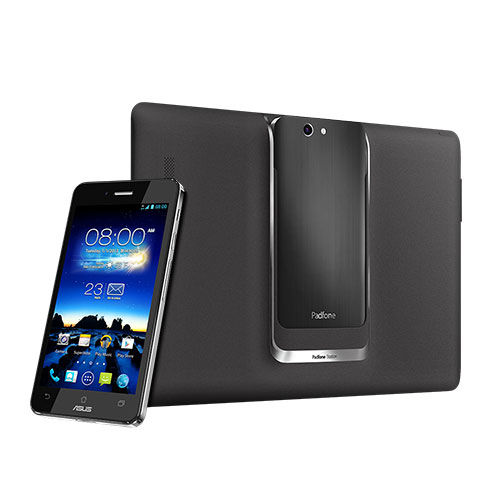
The two-in-one Padfone

The Asus Padfone aims to solve this problem by making one device –plus an accessory– fulfil both roles. Essentially you are always using the smartphone, but with the choice of using it in ‘phone mode’ –which is exactly the same as any other smartphone, or “tablet mode” where you slot the phone into a slot on the back of a larger ten inch display. So, you have what look like two separate devices but instead of being a tablet the larger one is just a bigger display for the phone to use. A benefit here is that, when you plug it in you get the same home screens, same wallpaper, same icon placement, same data, same apps as when in phone mode, only this time with a bigger, higher-res display.

The Padfone 1 has been out a while and the 2nd generation has just launched, with a third — the Padfone Infiinty– already announced for a mid-2013 release. I have to say I’m tempted by the idea. For me the combination has a kind of Thurderbird 2&4 coolness, where one thing nestles inside another and the whole is greater than the sum of the parts. I am currently using an Android phone and an Android tablet, and do sometimes get frustrated with the need to clear email and Facebook notifications twice, update the same apps on both devices and so on.

What do you think? Would you be tempted?

Apple TV: The Console-Killing Games Console?

In this article today by Chris Smith of TechRadar he suggests that, if only Apple were to open up their Apple TV concept to games developers, it could put larger games consoles like XBox 360 and the Nintendo Wii U out of business. He may have a point.

This little box is already in thousands of homes, and at under £100 it’s not a purchase you have to think too much about if you’re an Apple-ite. Smith talks about the quick ‘n’ easy developer options for iPhone and iPad game developers, and imagines a similar App Store experience on the Apple TV, where you’d buy small and cheap games on a whim. I can see that happening but Apple would need to bring out a new version with more internal storage, or at least a way to connect an external hard disk like Nintendo does with Wii U. The Apple TV’s internal storage is currently only 8Gb and is used to cache streaming media, store rented movies etc., so right now it doesn’t really have anywhere to put a bunch of purchased games.

True, the ‘big’ consoles offer bigger gaming experiences, but little pick-up-and-play games are what mobile device users are spending their money on. Watch this space I guess…

Testimonial: Alan and Charm

I am indebted to Alan & Charm B for sending me this testimonial.

They approached me for advice on buying, setting up and using Apple Macintosh computers to pursue their creative interests of photography, video editing, and writing. I visited them several times and was pleased to see their knowledge and expertise grow along with their home network.

Here’s what they say about their experience:

“We are ever grateful for the services we received from Chris Neal.  He set up our first computer, demonstrated it’s functions and helped us to get started with our work in various fields (photography, video editing, word processing). His help was concise and clear.  He returned to answer our questions and help us with subsequent queries.  As well as efficient as a professional, we appreciated Chris’s friendly personality. We have never looked back and don’t hesitate in recommending Chris.”

Alan & Charm B.

Why not get in touch to see how I could help you reach your technology goals.

Ten Tips for Better Photos

Are your photos the best they can be? Do you wish you understood your camera and its functions better? Do you want just holiday snaps or vivid memories that you and your friends will love to look at? Most modern digital cameras have amazing capabilities, but if you don’t know the basics of good photography you can often end up with lacklustre results. Here’s a simple list of Top Ten Tips to Better Photos that I found on the web. Most of these don’t involve much technical knowledge, just a question of stopping to think about what result you want before you press the shutter.

I can offer personal tuition on these and other techniques that will transform your photography and give you more professional-looking results quickly.

Here are some examples of my own work:

This slideshow requires JavaScript.


If you’d like to start on the road to getting results like these with your camera, contact me for a free initial consultation.


Sonos: Your Music, Wireless, Anywhere in the House

I’ve been looking at the Sonos system for a couple of days now and I’m impressed by what I’ve seen. If I were in the market for a digital music solution myself I’d certainly look at buying Sonos equipment.

For those not familiar, Sonos is a modular system of speakers and software that between them create a wireless music network around the home. From your iPhone, iPad or Android device you can then select what you want to hear and have the same track playing in multiple rooms, or different music per room, according to your preference.

The concepts around how Sonos works can be confusing for those who don’t have a technical bent. I can imagine how daunting it must be wondering which components are right for you, how to get them talking to each other, and so on. If you’re considering the purchase of a Sonos system I can help you with buying advice, installation and setup.

My Sonos setup packages start at £80 and can go up to £500 (equipment not included), depending on the size of your home and how many components you want to include. If Sonos figures in your immediate future and you’d like help getting it set up and working seamlessly, contact me for a free initial consultation.

Microsoft Surface: will you buy one?

I have to admit I’m torn on this one. Personally I’m a Mac user who has Android mobile devices (I’ve ‘done’ iPhones and iPads in the past too), so my own house is a Windows-free zone. Microsoft’s foray into the tablet market — the Surface — is interesting in a way that is both good and bad. The inclusion of a ‘proper’ keyboard gives it a unique look that makes it stand out from the sea of tablets now available, but then they would have had to do something like that because the software and user experience alone probably wouldn’t have given them an edge over Apple, Samsung and others.

I can’t even figure out from this video which market they’re aiming at. Is it a tool for business users or a toy for fashionable teenagers?

Watch this and then tell me please!

Well? Any clue?

Whichever tablet you end up buying — even a Surface, I can help you optimise it and get maximum value for your purchase.

Check out life on your street with streetlife.com

The other day a new acquaintance made me aware of Streetlife: a new social networking and news network for local neighbourhoods. It’s an easy and engaging idea to grasp. Imagine if you had Facebook, but just for the town or village where you live. You’d still want Facebook of course, but now you’d have a place where you can go to talk about local things, or search for a local business. It’s a little more personal, a little more private, a little more about you and your neighbours.

I jointed Streetlife today as another way of promoting my new business as a Personal Technology Consultant. When you’re trying to spread the word about a new venture the more channels you use the better, and I hope Streetlife will help me connect with people who can use my services in my local area.

Whether you live near me or not, you’re local to where you are, and Streetlife could bring you closer to those close to you.

Streaming, Streaming Everywhere

Streaming, Streaming Everywhere

Apple’s AirPlay wireless display and streaming technology is great…IF you have a house full of Apple devices. How can you also invite your Windows PCs and Android devices to the media streaming party?

Thought you might like to see this LifeHacker article that explains how and gives links to some useful add-ons and utilities that can do just that.

How well do you know your gadgets?

A quick poll for the weekend: Think about the mobile device you use most — iPhone? iPad? Android phone? How well would you say you know all its features? If you could quickly vote in my poll you’d help me out in determining what the most common teaching needs are.


One last question: if you feel like answering this one please leave a comment: If there was one thing you could change or improve about your mobile device and the way you use it, what would it be? What’s the difference between today and your perfect tomorrow?

Thanks!

Stream your media from your Android device to your TV with Skifta

If you’re an Apple fan you can look away now — you have Apple’s Airplay to do this (assuming you have at least one Apple TV in the house).

Android users! Jealous of your iPad-owning friends’ ability to play movies, music and photos from their iPad on their TV? Well you can do that too, with a little tweaking and an app called Skifta.

Actually there are several ways to wirelessly connect your Android phone or tablet to your laptop and/or Smart TV. In fact the next version of Android (4.2, JellyBean update) will include native wireless display support. Until then here’s a nice and easy way to do it:

First you need a TV that supports the Digital Living Network Alliance (DLNA) standard. Most flat screen TVs from the main manufacturers should support this. The TV must be connected to the same Wi-Fi network that the device is connected to.

Next, go to the Google Play market on your device and download the free Skifta app. Run that app then go into your TV’s menus and locate the option to play media on the home network. You should see your Android device listed as an available source. Click on that and then browse your device’s music, photos and videos and play them on your TV screen.

One advantage this method has over Apple’s AirPlay is that you can do this anywhere, in anyone’s house, on a friend’s TV etc., as long as their TV meets the requirements above and they allow your device on their home network.

I installed this yesterday and it works pretty well.